
YouTube expertise, from research to your editor
For solo creatorsdoing the workof a team.
Titles, thumbnails, hooks, scripts, shot plans — Slate does as much of it as you need. Make more videos with better strategy in half the time.
7-day free trial with a card. 30-day money-back guarantee. Cancel anytime.




 5.0×
5.0×

 1280 × 720


I spent forty hours building the perfect productivity system. And then I… used it for three days.
I've gone through that cycle many, many times. So I stopped trying — ditched the systems — and I became way more productive. But not without big problems.
Research & Ideate
Start from the videos that already worked
Save the outliers, hooks, and thumbnail patterns you study, then carry them into a project to shape the angle. Chat grounds its ideas in what you've collected — so the next video starts from evidence, not a blank page.





Packaging
Win the click before you write a word
Brainstorm titles and thumbnails together, drag them into combinations, and validate each against real competition. Your video earns its click before the script even exists.
Packaging · Thumbnail studio
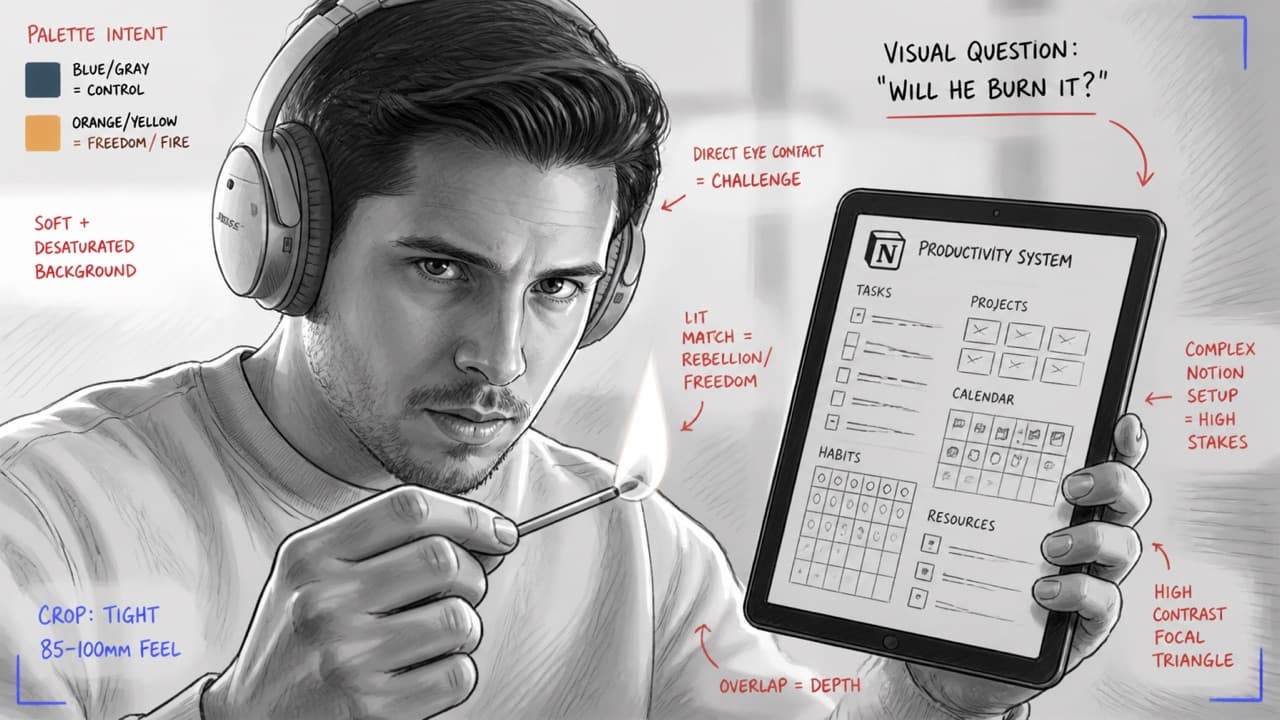
Take the thumbnail from idea to finished frame
Describe the concept and Slate sketches it with framing and palette notes — the blueprint for the thumbnail you'll actually shoot. Nothing replaces a frame you shot yourself; but when time is tight, Slate renders a polished version you can drop straight into the video.
Concept
Me holding an iPad with a complex Notion productivity system in one hand — and in the other, a lit match, brought close to the screen. About to burn it. My detachment from the system, in a single frame.
Sketch
Finished frame

Scriptwriting
A writing partner that sounds like you
Chat writes alongside you in your own voice — drawing on your past scripts and any YouTube video you point it at. Rewrite a paragraph, restructure a section, or swap a single line; every edit streams live into the document, exactly where you asked for it.
Scriptwriting · B-roll
Plan every shot inside the script
A b-roll track opens under each paragraph. Plan the shots you'll film and reuse footage you already have — drag to reorder, move clips between paragraphs, or ask chat to surface matching clips from your library by describing what you need. Walk into the shoot with a list that maps to what you wrote.
Edit Prep
Save hours of boilerplate editing
Slate analyzes your footage, cleans up bad takes, strips out silences, and cuts the A-roll to your script — with all of your B-roll already overlaid in the right place. Export A-roll and B-roll to Final Cut or Premiere with the structure built, ready for your (or your editor's) artistic touch.
 +
+
Video Library
Every clip you've ever shot, searchable
Upload all your existing b-roll once. Search it by what's actually in the frame, and let Slate auto-surface the right clips for future scripts, so your archive keeps paying off instead of gathering dust.
Coming soon
And soon, an editor built for this workflow
The timeline you export opens into a native Slate editor — the same script-driven, magnetic A-roll-over-B-roll model you already plan in, but hands-on. Trim on the words, slide inserts, keep the cut tight. Same language, now at your fingertips.
Clips
On the roadmap. Early access for members when it ships.
See it in action
Watch Slate in action
See how a full project comes together—from idea capture to timeline export.
Pricing
Simple plans. No surprises.
Choose the plan that matches your publishing system.
7-day free trial with a card. Annual billing is 2 months free.
- Expert YouTube research
- Intelligent ideation engine
- Title and thumbnail concept ideation
- Thumbnail image generation
- Scriptwriting in your own voice
- Video library with auto B-roll surfacing in the script
- Smart video edit — a first pass, ready for your polish
About 3 long-form videos a month
Founding rate for the first 100 subscribers — locked for life.
- Expert YouTube research
- Intelligent ideation engine
- Title and thumbnail concept ideation
- Thumbnail image generation
- Scriptwriting in your own voice
- Video library with auto B-roll surfacing in the script
- Smart video edit — a first pass, ready for your polish
About 12 long-form videos a month
- Expert YouTube research
- Intelligent ideation engine
- Title and thumbnail concept ideation
- Thumbnail image generation
- Scriptwriting in your own voice
- Video library with auto B-roll surfacing in the script
- Smart video edit — a first pass, ready for your polish
About 25 long-form videos a month
FAQ
Common questions
Quick answers to what people ask most.
Our guarantee
Try Slate for 7 days. Use it for 30 days. Not for you? Full refund.
A card is required to start the trial, and billing begins after seven days. Use Slate on a real video — if it doesn't earn its place in your workflow, request a full refund within your first 30 days. No questions asked.
Plan. Create. Publish.
Run a serious channel. Without running a team.
Titles, thumbnails, hooks, scripts, shot plans — all in one project that knows your channel, ending in a timeline that opens in Final Cut or Premiere.